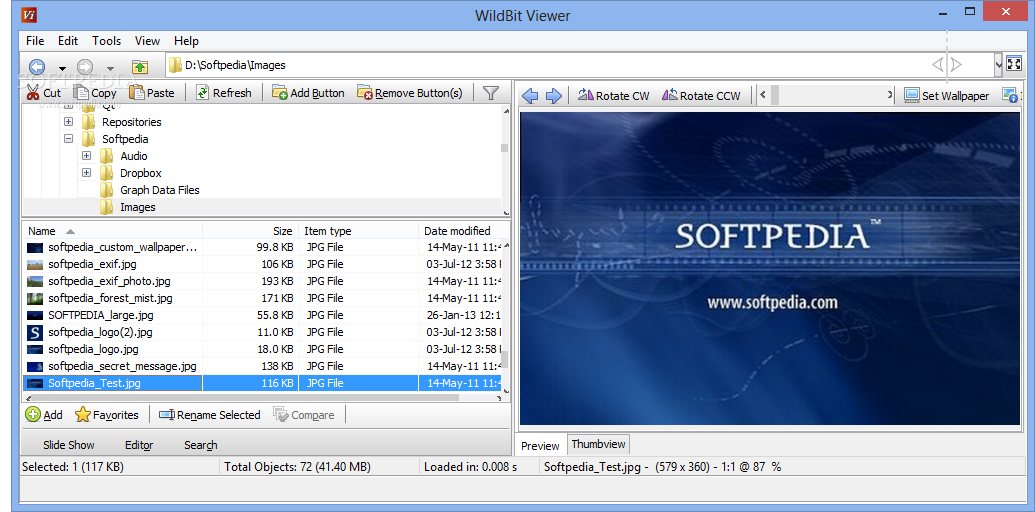
Viewer, Slide Show, Editor,F avorites, image compare, Thumbnail browser and more.
WildBit Viewer is compact & fast image viewer with slide show and editor. Eye catching interface within blazing fast folder, file list and thumbnail viewer. Viewer includes also Image Info with Image EXIF meta data JPEG and TIFF support and IPTC (IIMV4) information (like PhotoShop file info) from JPEG and TIFF, Thumbview has changeable views, sorting and thumbnail predefined sizes for fast thumbnail size setting.
Viewer also includes shell toolbar, you can drop your favorite folder there and use it as an organizer. WildBit Viewer also includes an image compare feature. In Compare you can compare images side-by-side. In Favorites you can save list of favorite images and load list later on and you can create custom show in to Slide Show also that list you can edit with Custom Show List Editor.
With Slide Show you can view images within 172 different transition effects. Slide Show includes now multi-monitor support for fast switching between two monitors. WildBit Viewer supports all major graphic formats including BMP, JPEG, JPEG 2000, GIF, PNG, PCX, TIFF, WMF and TGA (over 70 formats).
Note: This software is freeware for private (non-commercial) or educational (including non-profit organization) use.
Here are some key features of "WildBit Viewer":
· Explorer style file handling with customizable headers
· Full screen View
· Favorites
· Thumbnail Browser
· Wallpaper set capability (JPEG only)
· Slide Show with Custom Show
· Shell Tool Bar for organizing images
· Image Rotate
· Image Compare
· Zoom
· Support for all major graphic formats including BMP, JPEG, JPEG 2000, GIF, PNG, PCX, TIFF, WMF and TGA
Requirements:
· Celeron 300MHz
· 128 MB RAM
· 10.5 MB (~w/o help 8.5 MB)
What's New in This Release
Viewer - Build: Alpha 2.0:
· Changed Main: Slide Show button now checks if Replace is checked in Slide Show.
Slide Show - Build: Alpha 2.0:
· Added Main+Control Box: Replace, When checked (default) Select Folder will replace current folder(s) and when not checked select folder will add another folder.
· Note!, when multiple folders is added: Filters, Watch Folder Changes and related actions cannot be enabled.
· Added Main: Add Folder(s) in to List (+), Remove Folder(s) from the List (-). Note! limit is 50.
· Changed Main+Control Box: Under Browse, Reload Folder is now Reload.
· Changed Main+Control Box: Under Browse, Select Folder and Include Subfolders are disabled instead of hidden while show is going.
Editor - Build: Alpha 2.0:
· Added Main: Under Tools menu, Visual Compare (Black Background) (Shift+Ctrl+R).
Search - Build: Alpha 2.0:
· Changed Main: Add Filename in to List and Add Location in to List limits to 50

Viewer also includes shell toolbar, you can drop your favorite folder there and use it as an organizer. WildBit Viewer also includes an image compare feature. In Compare you can compare images side-by-side. In Favorites you can save list of favorite images and load list later on and you can create custom show in to Slide Show also that list you can edit with Custom Show List Editor.
With Slide Show you can view images within 172 different transition effects. Slide Show includes now multi-monitor support for fast switching between two monitors. WildBit Viewer supports all major graphic formats including BMP, JPEG, JPEG 2000, GIF, PNG, PCX, TIFF, WMF and TGA (over 70 formats).
Note: This software is freeware for private (non-commercial) or educational (including non-profit organization) use.
Here are some key features of "WildBit Viewer":
· Explorer style file handling with customizable headers
· Full screen View
· Favorites
· Thumbnail Browser
· Wallpaper set capability (JPEG only)
· Slide Show with Custom Show
· Shell Tool Bar for organizing images
· Image Rotate
· Image Compare
· Zoom
· Support for all major graphic formats including BMP, JPEG, JPEG 2000, GIF, PNG, PCX, TIFF, WMF and TGA
Requirements:
· Celeron 300MHz
· 128 MB RAM
· 10.5 MB (~w/o help 8.5 MB)
What's New in This Release
Viewer - Build: Alpha 2.0:
· Changed Main: Slide Show button now checks if Replace is checked in Slide Show.
Slide Show - Build: Alpha 2.0:
· Added Main+Control Box: Replace, When checked (default) Select Folder will replace current folder(s) and when not checked select folder will add another folder.
· Note!, when multiple folders is added: Filters, Watch Folder Changes and related actions cannot be enabled.
· Added Main: Add Folder(s) in to List (+), Remove Folder(s) from the List (-). Note! limit is 50.
· Changed Main+Control Box: Under Browse, Reload Folder is now Reload.
· Changed Main+Control Box: Under Browse, Select Folder and Include Subfolders are disabled instead of hidden while show is going.
Editor - Build: Alpha 2.0:
· Added Main: Under Tools menu, Visual Compare (Black Background) (Shift+Ctrl+R).
Search - Build: Alpha 2.0:
· Changed Main: Add Filename in to List and Add Location in to List limits to 50
| Developer: License / Price: Size / OS: Last Updated: | Marko Hietanen Freeware / FREE 4.3 MB / Windows All August 27th, 2010 |
| Download: | WildBit Viewer 5.8 Alpha 4.0 / 5.7 |